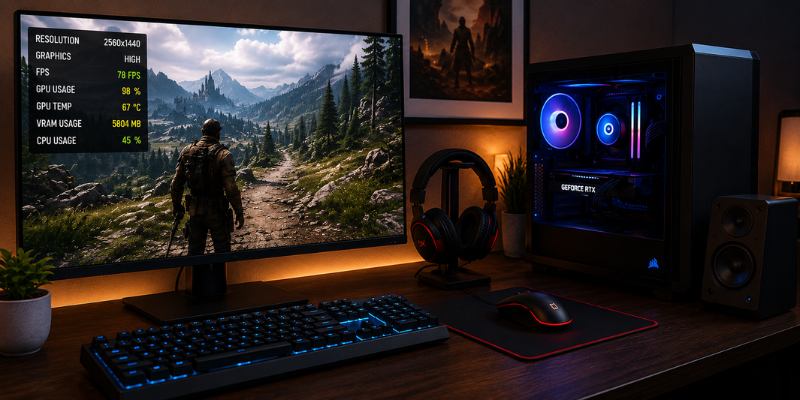
There comes a point in every PC gamer’s journey when 1080p no longer feels impressive, yet 4K still demands more hardware than the budget allows. That’s where a 1440p high settings GPU becomes the ideal choice. It delivers sharper visuals, smoother gameplay, and the perfect balance between performance and image quality, making modern games look and feel significantly better without the high cost of 4K gaming.
Choosing the right 1440p high settings GPU isn’t just about buying the fastest graphics card. It’s about finding a GPU that delivers consistent frame rates, supports modern gaming technologies, and remains relevant for years. This guide explores the best options, what to look for, and how to make the smartest purchase.
Why 1440p Gaming Has Become the Sweet Spot
The popularity of 1440p monitors has grown rapidly over the last few years, and for good reason. They provide a noticeable visual upgrade over Full HD while avoiding the heavy performance demands of native 4K.
For many gamers, 1440p offers:
- Sharper textures and clearer details
- Better image quality on 27-inch and 32-inch displays
- Higher refresh rates with modern GPUs
- Excellent balance between graphics quality and FPS
Whether you’re exploring massive open worlds or competing in online shooters, 1440p delivers an immersive experience without pushing hardware to its limits.
What Makes a Great 1440p High Settings GPU?
Not every graphics card performs equally well at this resolution. A good GPU should maintain stable frame rates even when visual settings are pushed close to Ultra.
Important characteristics include:
- At least 12GB of VRAM for future game releases
- Strong rasterization performance
- Efficient ray tracing capabilities
- AI upscaling technologies like DLSS or FSR
- Low power consumption and good thermal efficiency
Modern games continue increasing texture quality and graphical complexity. Investing in a GPU with sufficient memory helps prevent performance bottlenecks in the coming years.
Best 1440p High Settings GPU Options
NVIDIA GeForce RTX 5070
The RTX 5070 is among the strongest choices for high-refresh-rate 1440p gaming.
Advantages include:
- Excellent ray tracing performance
- DLSS 4 support for higher FPS
- Efficient power usage
- Consistent performance in demanding AAA titles
It comfortably handles games like Cyberpunk 2077, Black Myth: Wukong, Alan Wake 2, and Starfield with impressive visual settings.
AMD Radeon RX 9070 XT
AMD continues offering exceptional value for gamers focused on traditional rendering performance.
Highlights include:
- Large VRAM capacity
- Outstanding raster performance
- Strong price-to-performance ratio
- Excellent support for modern gaming features
For players who prioritize raw FPS over advanced ray tracing, this GPU is a compelling option.
NVIDIA GeForce RTX 4070 Super
Although slightly older, this graphics card remains one of the safest investments for 1440p enthusiasts.
Reasons gamers still recommend it:
- Mature drivers
- Excellent DLSS implementation
- Quiet operation
- Reliable performance across nearly every modern game
Many users report maintaining over 100 FPS at High settings in numerous popular titles.
AMD Radeon RX 7800 XT
Budget-conscious gamers should not overlook the RX 7800 XT.
Its strengths include:
- 16GB VRAM
- Excellent 1440p gaming performance
- Competitive pricing
- Strong longevity
For anyone upgrading from older cards like the RTX 3060 or RX 6700 XT, the performance jump is significant.
Expected Performance at High Settings
A quality 1440p high settings GPU should comfortably achieve these approximate frame rates:
| Game | Average FPS |
|---|---|
| Cyberpunk 2077 | 80–120 FPS |
| Baldur’s Gate 3 | 120–170 FPS |
| Call of Duty | 130–180 FPS |
| Forza Horizon 5 | 120–170 FPS |
| Hogwarts Legacy | 90–140 FPS |
| Apex Legends | 180–250 FPS |
| Fortnite | 160–240 FPS |
Actual performance varies depending on CPU, RAM speed, graphics settings, and whether technologies like DLSS or FSR are enabled.
VRAM Matters More Than Ever
Several recent AAA games consume significantly more video memory than titles released just a few years ago.
Choosing a GPU with enough VRAM helps avoid:
- Texture pop-in
- Stuttering
- Frame drops
- Reduced texture quality
Recommended VRAM amounts:
- 8GB: Entry-level 1440p gaming
- 12GB: Comfortable for most gamers
- 16GB or more: Ideal for long-term use
Buying slightly more VRAM today often extends the usable life of your graphics card.
Building the Ideal 1440p Gaming PC
A graphics card performs best when paired with balanced hardware.
Recommended components include:
- Modern 6-core or 8-core processor
- 32GB DDR5 memory
- PCIe Gen4 NVMe SSD
- 750W–850W quality power supply
- High-airflow computer case
- 144Hz or 165Hz gaming monitor
I have seen many gamers spend most of their budget on a GPU while keeping an outdated processor. This often results in CPU bottlenecks that prevent the graphics card from reaching its full potential.
Balanced systems consistently deliver smoother gameplay.
Should You Buy Now or Wait?
Technology evolves quickly, but waiting forever means never upgrading.
Consider buying now if:
- Your current GPU struggles below 60 FPS
- You recently purchased a 1440p monitor
- New game releases perform poorly
- You want improved ray tracing and AI features
Waiting may make sense if another GPU generation is only weeks away, but for most gamers, today’s mid-to-high-end graphics cards already provide exceptional value.
Practical Tips Before Buying
Keep these recommendations in mind:
- Compare benchmark results instead of marketing claims.
- Check your case dimensions before purchasing.
- Ensure your power supply meets recommended wattage.
- Consider cooling and noise levels.
- Buy from trusted retailers with solid warranty coverage.
- Look beyond raw FPS and evaluate long-term value.
A well-informed purchase usually lasts several years, making the extra research worthwhile.
Frequently Asked Questions
Is 12GB VRAM enough for 1440p high settings?
Yes. For most current games, 12GB provides excellent performance. However, 16GB offers greater future-proofing for upcoming AAA releases with larger textures.
Which GPU offers the best value for 1440p gaming?
The AMD Radeon RX 7800 XT and NVIDIA RTX 5070 are among the strongest value options, offering an excellent mix of performance, efficiency, and longevity.
Can I play 1440p at Ultra settings?
Absolutely. Many modern GPUs can run games at Ultra settings, although enabling ray tracing may reduce frame rates unless DLSS or FSR is used.
Is ray tracing worth using at 1440p?
Yes, if your GPU supports it well. Ray tracing significantly improves lighting and reflections, and AI upscaling technologies help recover much of the lost performance.
How long will a good 1440p GPU remain relevant?
A quality graphics card with 12GB–16GB of VRAM can comfortably handle modern games for approximately four to six years, depending on graphical expectations and future game requirements.
Conclusion
A powerful 1440p high settings GPU transforms gaming by delivering crisp visuals, high frame rates, and a noticeably smoother experience. Whether you prefer NVIDIA’s advanced AI technologies or AMD’s outstanding value, today’s graphics cards offer more choices than ever before. Focus on balanced performance, sufficient VRAM, and long-term reliability rather than chasing benchmark numbers alone. With the right GPU, your gaming PC will remain capable and enjoyable for many years.