If you’re searching for an honest HP Notebook 14 review, you’ve come to the right place. Choosing a budget laptop can be challenging because many models look similar but perform very differently in everyday use. The HP Notebook 14 promises reliable performance, solid battery life, and an affordable price for students, professionals, and home users. In this review, we’ll explore its design, display, performance, battery life, and overall value to help you decide whether it’s the right laptop for your needs.
HP Notebook 14 Review: First Impressions and Design
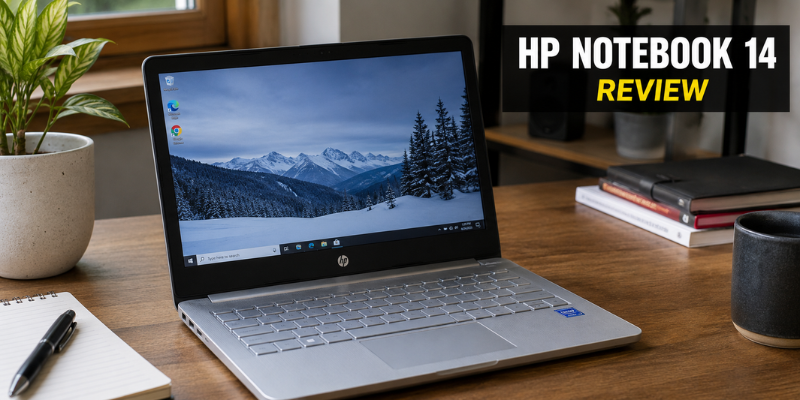
The first thing you notice about the HP Notebook 14 is its clean and minimalist appearance. While it doesn’t try to look like a premium ultrabook, it still feels modern enough for classrooms, offices, and home use.
Its lightweight construction makes carrying it between meetings or lectures surprisingly comfortable. Whether you’re commuting every day or simply moving between rooms at home, portability is one of its biggest strengths.
The plastic chassis keeps costs low without making the laptop feel cheap. The finish also resists fingerprints better than many glossy alternatives.
Build Quality
Although the body is mostly plastic, it feels sturdy for everyday handling. The hinge opens smoothly, and the keyboard deck shows minimal flex during normal typing.
For a budget laptop, HP has done a respectable job balancing durability with affordability.
HP Notebook 14 Display Review and Viewing Experience
The HP Notebook 14 is available in different display configurations depending on the model. Choosing a Full HD (1920×1080) version significantly improves the viewing experience compared to the older HD panels.
The screen performs well for:
- Office work
- Web browsing
- Online classes
- Watching YouTube
- Streaming movies
Colors are reasonably accurate for casual use, although creative professionals working with photo or video editing may find the display less suitable.
Brightness
Indoor visibility is generally comfortable. Outdoors or under direct sunlight, the display becomes harder to read due to its average brightness level.
HP Notebook 14 Performance Review for Everyday Use
Performance varies depending on the processor configuration. HP offers Notebook 14 models with Intel Core i3, Core i5, AMD Ryzen 3, and Ryzen 5 processors.
For everyday productivity, the laptop handles common tasks smoothly.
Typical workloads include:
- Microsoft Office
- Google Docs
- Zoom meetings
- Email management
- Multiple browser tabs
- Netflix streaming
During testing, opening documents, switching between applications, and video conferencing felt responsive on SSD-equipped models.
Multitasking
An SSD and at least 8GB of RAM make a noticeable difference. With this combination, everyday multitasking feels fluid, allowing users to work without constant slowdowns.
Gaming Performance
This is not a gaming laptop.
Older or lightweight games such as Minecraft, Valorant (low settings), or League of Legends can run acceptably, but demanding AAA games require dedicated graphics hardware.
Keyboard, Touchpad, and User Comfort
Typing is one area where HP consistently performs well, and the Notebook 14 continues that tradition.
The keyboard offers:
- Comfortable key spacing
- Quiet typing
- Good key travel
- Responsive feedback
Students writing assignments or professionals preparing reports will appreciate the comfortable typing experience during long sessions.
The touchpad is responsive and supports Windows Precision gestures, making navigation smooth without requiring an external mouse.
Battery Life and Charging
Battery life depends on screen brightness, processor choice, and daily workload.
Under normal office use—which includes web browsing, document editing, and video calls—the HP Notebook 14 generally lasts around 6 to 8 hours on a single charge.
Watching movies continuously reduces that figure slightly, while lighter workloads may extend battery life further.
Fast charging support on many models is particularly useful. A short charging session during lunch can provide several additional hours of productivity.
Ports, Connectivity, and Expandability
Despite its slim profile, the HP Notebook 14 includes a practical selection of ports.
Most configurations include:
- USB Type-A ports
- USB Type-C
- HDMI output
- Headphone jack
- SD card reader (selected models)
- Wi-Fi
- Bluetooth
These options eliminate the need for multiple adapters during everyday work.
Storage upgrades are also possible on many versions, allowing users to extend the laptop’s lifespan as their storage needs grow.
Who Should Buy the HP Notebook 14?
The HP Notebook 14 isn’t designed for everyone, but it excels within its target audience.
It’s an excellent choice for:
- College students
- School students
- Office employees
- Freelancers
- Remote workers
- Writers
- Small business owners
If your daily activities revolve around productivity rather than heavy creative software or gaming, this laptop offers excellent value.
It May Not Be Ideal For
Consider a more powerful laptop if you regularly work with:
- Professional video editing
- 3D rendering
- CAD software
- Advanced programming workloads
- Modern AAA gaming
Pros and Cons
Pros
- Lightweight and portable
- Comfortable keyboard
- Reliable everyday performance
- Good battery life
- SSD provides fast boot times
- Affordable pricing
- Modern design
- Decent port selection
Cons
- Average display brightness
- Plastic construction
- Not suitable for heavy gaming
- Limited color accuracy for professional creators
- Performance depends heavily on the chosen configuration
Final Verdict
After spending time evaluating the laptop, it’s clear that the HP Notebook 14 focuses on practicality rather than flashy features.
It delivers dependable performance for everyday computing while maintaining an affordable price point. The combination of portability, comfortable typing, solid battery life, and responsive SSD storage makes it an excellent companion for students and office professionals.
If your needs include web browsing, document editing, online meetings, streaming, and light multitasking, the HP Notebook 14 remains one of the smarter budget laptop choices available today.
Frequently Asked Questions
Is the HP Notebook 14 good for students?
Yes. It offers enough performance for assignments, online learning, research, presentations, and video conferencing while remaining lightweight enough to carry every day.
Can the HP Notebook 14 run Windows 11?
Most recent HP Notebook 14 models fully support Windows 11. Many newer units come with Windows 11 pre-installed.
Is the HP Notebook 14 suitable for gaming?
It can handle lightweight games and older titles, but it isn’t designed for demanding modern games due to its integrated graphics.
How long does the battery last?
Depending on your workload, battery life typically ranges between 6 and 8 hours, with lighter usage sometimes lasting longer.
Is the HP Notebook 14 worth buying?
For users looking for an affordable laptop for work, study, browsing, and entertainment, the HP Notebook 14 offers strong value and dependable everyday performance.
Conclusion
The HP Notebook 14 proves that a reliable laptop doesn’t have to be expensive. It strikes a practical balance between performance, portability, and affordability, making it a dependable choice for everyday users. While it isn’t built for gaming or professional creative work, it performs exceptionally well for study, office tasks, browsing, and streaming. If you’re searching for a budget-friendly laptop that handles daily computing with confidence, the HP Notebook 14 is certainly worth considering.