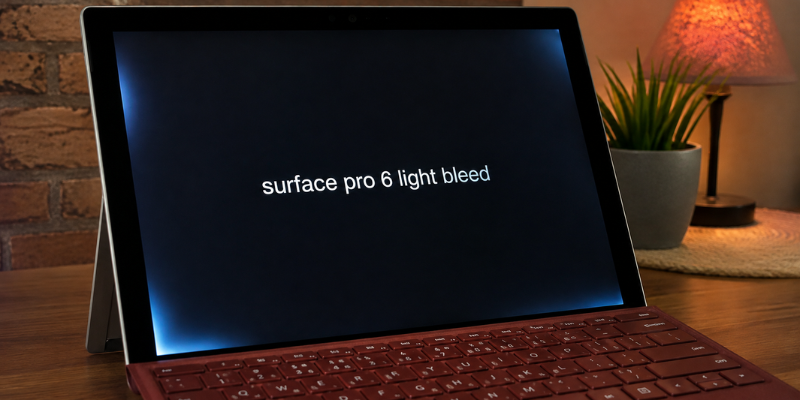
The Surface Pro 6 remains a capable 2-in-1 for work, study, browsing, and entertainment, but its display can reveal an annoying issue in dark environments: light bleed. You may notice bright patches around the screen edges when viewing a black image or watching a movie in a dark room. At first, it can look like a serious screen failure.
The good news is that light bleed does not automatically mean your Surface Pro 6 is damaged beyond use. Understanding what causes it, how to test it properly, and when it deserves attention can save you from an unnecessary repair.
What Is Surface Pro 6 Light Bleed?
Light bleed is a display phenomenon where some of the screen’s backlight becomes visible around the edges or corners instead of appearing evenly behind the display panel.
The Surface Pro 6 uses a 12.3-inch PixelSense display with a 2736 × 1824 resolution and 3:2 aspect ratio. Microsoft designed it as a high-resolution touchscreen, and the display is covered with Corning Gorilla Glass.
Light bleed is easiest to see when the screen is displaying very dark content. For example, imagine watching a movie with black bars at the top and bottom in a completely dark room. If one corner appears slightly gray or brighter than the rest, you may be seeing backlight bleed.
It is important to distinguish this from a dead pixel, stuck pixel, screen burn-in, or software graphics problem. Light bleed is generally related to how illumination appears through the physical display assembly.
Why Does Light Bleed Happen?
The most common reason is simply the construction and tolerances of the display panel. A thin display has several layers that must sit together precisely. Small variations in pressure, alignment, or panel assembly can allow more light to become visible near an edge.
Another factor is the way the device is being viewed. Light bleed that seems obvious at maximum brightness in a dark bedroom may be almost impossible to notice during normal daytime use.
Temperature and physical pressure can also influence what you see. A display that has been squeezed, dropped, or subjected to pressure around its frame should be examined more carefully, especially if the bright area appeared after the incident.
This is why a small amount of edge glow should not immediately be treated as a catastrophic fault. The important question is whether it is unusually strong and whether it affects normal use.
How to Test Surface Pro 6 Light Bleed
Before deciding that your Surface Pro 6 has a defective screen, perform a simple test under controlled conditions.
Start by cleaning the display gently so fingerprints or reflections do not confuse the result. Then turn off unnecessary lights in the room and display a completely black image.
Next, increase the screen brightness and inspect all four corners and the edges. Look for areas that appear noticeably brighter than the surrounding black portion.
Try the same test at a lower brightness level. This matters because a screen that looks terrible at 100 percent brightness may look perfectly normal at 40–60 percent during everyday use.
You can also compare several types of content:
- A completely black screen
- A dark movie scene
- A gray background
- A normal webpage
- A white document
- A photo with darker areas
If the bright patches are visible only on a black screen in a dark room, the issue may be more cosmetic than functional.
Light Bleed vs. IPS Glow
These two terms are often used interchangeably, but they are not exactly the same.
Light bleed generally appears as localized brighter areas, often along an edge or corner. It tends to stay in a particular location regardless of your viewing position.
IPS glow, on the other hand, can change depending on your viewing angle. A corner may appear brighter when you move your head or change the angle of the screen.
This distinction is useful when diagnosing a Surface Pro 6 display. If the effect changes substantially as you move relative to the screen, viewing-angle behavior may be contributing to what you see.
A practical test is to look directly at the display, then slowly change your viewing position. If the brightness pattern changes significantly, it may not be simple backlight bleed.
Can You Fix Surface Pro 6 Light Bleed?
There is no reliable Windows setting that can physically eliminate backlight bleed. Because the issue is associated with the display hardware, changing brightness, updating Windows, or reinstalling graphics drivers generally cannot repair the underlying panel.
However, there are several ways to make the problem less noticeable.
Lowering brightness is usually the simplest option. Dark-room viewing at maximum brightness is also one of the worst conditions for noticing edge illumination, so using a comfortable brightness level can make a significant difference.
You can also avoid judging the screen solely from a black test image. Real-world content contains colors, textures, text, and movement, which can make minor light bleed practically invisible.
Microsoft’s general Surface display troubleshooting guidance covers issues such as distortion, flickering, discoloration, artifacts, and other display problems.
If your display has developed a new bright area, visible discoloration, lines, flickering, or other symptoms in addition to light bleed, it is worth treating the problem as a broader display fault rather than assuming everything is normal.
When Should You Consider Repair?
The key is severity.
A small amount of light around one corner that you can see only with a black screen in a dark room may not justify replacing the display, particularly if everything else works correctly.
A much more serious situation is when bright patches are clearly visible during normal work. For example, if you are editing photos, reading documents, or watching ordinary video and the uneven brightness constantly distracts you, the problem becomes more than a technical curiosity.
You should also seek professional assistance if the display has:
- New lines or flickering
- Significant discoloration
- Touch problems
- Cracks or physical damage
- Large bright areas
- A rapidly worsening appearance
- Symptoms that appeared after pressure or impact
The Surface Pro 6 originally came with a one-year limited hardware warranty, although warranty coverage depends on the specific purchase, region, and current service status. Microsoft also provides current information about Surface warranty and repair options.
Because the Surface Pro 6 is an older model, it is sensible to compare the cost of a professional repair with the value of the device before committing to a replacement display.
Buying a Used Surface Pro 6? Check the Screen First
Light bleed matters even more when buying a used Surface Pro 6.
A seller may describe the device as being in “excellent condition,” but photographs rarely reveal subtle display problems. If possible, inspect the actual device before purchasing.
Open a black image and view it in a relatively dim environment. Check the corners, edges, and center of the display. Then test normal content at a comfortable brightness.
Do not spend ten minutes staring at a black screen and reject an otherwise excellent device because of an extremely minor variation that you would never notice during normal use. At the same time, do not ignore obvious bright patches simply because the seller calls them “normal.”
A balanced inspection is the best approach.
Is Surface Pro 6 Light Bleed a Serious Problem?
For most users, the answer depends on how severe it is and when it becomes visible.
If you notice it only under very specific conditions, such as a pure-black test image at maximum brightness in a dark room, it may have little practical impact.
If you see uneven illumination every time you open a dark application or watch video, it can become genuinely frustrating.
The Surface Pro 6 was built around a high-resolution PixelSense touchscreen, so expectations for display quality are understandably high. The right decision is therefore not simply “light bleed equals bad screen.” Instead, judge the actual severity and its effect on your daily use.
Frequently Asked Questions
Does every Surface Pro 6 have light bleed?
No. Display uniformity can vary from one panel to another. Some units may show very little edge illumination, while others may show more noticeable bright areas under dark viewing conditions.
Can a software update fix Surface Pro 6 light bleed?
Usually, no. Genuine backlight bleed is a physical display characteristic rather than a Windows software problem. Software troubleshooting can be useful when the symptoms involve flickering, distortion, artifacts, or other graphics-related behavior, but it will not normally correct physical uneven illumination.
How can I tell if my Surface Pro 6 has light bleed?
Display a completely black image in a dark room and inspect the edges and corners at different brightness levels. Then test normal content. If the bright areas are visible only during the black-screen test, the practical impact may be minor.
Is light bleed covered by the Surface Pro 6 warranty?
Warranty decisions depend on Microsoft’s warranty terms, the device’s coverage status, region, and the nature of the issue. The original Surface Pro 6 specifications list a one-year limited hardware warranty. For a specific device, check its current warranty and service status with Microsoft.
Should I replace my Surface Pro 6 because of light bleed?
Not necessarily. If the display works normally and the light bleed is barely visible during everyday use, replacement may not be worthwhile. If the problem is severe or accompanied by flickering, discoloration, touch problems, lines, or physical damage, professional diagnosis is a better choice.
Conclusion
Surface Pro 6 light bleed can look alarming when you first notice it, particularly in a dark room with a black screen. However, minor edge illumination does not automatically mean the display is failing.
Test the screen at different brightness levels, distinguish light bleed from IPS glow and other display faults, and judge the problem according to real-world use. If the issue is severe or accompanied by other symptoms, professional service is the safer route.
In the end, the best screen test is not just a black image—it is how confidently and comfortably the Surface Pro 6 performs in the situations where you actually use it.