Have you ever found yourself listening to a great podcast, motivational speech, or music performance on YouTube and wished you could enjoy the audio without keeping the video open? That’s exactly why a youtube audio downloader has become one of the most searched online tools.
Whether you’re commuting, studying, exercising, or simply trying to save mobile data, downloading audio from YouTube can be incredibly convenient. In this guide, we’ll explore how YouTube audio downloaders work, what features matter most, how to stay safe, and how to choose the right solution for your needs.
What Is a YouTube Audio Downloader?
A youtube audio downloader is a tool that extracts the audio track from a YouTube video and converts it into an audio format such as MP3, M4A, WAV, or AAC.
Instead of downloading the entire video, you only save the sound, making the file much smaller and easier to store.
People commonly use these tools for:
- Educational lectures
- Podcasts
- Interviews
- Audiobooks
- Public domain music
- Language learning lessons
- Motivational speeches
The best downloaders preserve excellent audio quality while offering fast conversion speeds.
Why Use a YouTube Audio Downloader for Offline Listening
Everyone has different reasons for wanting audio instead of video.
For example, during a long road trip, listening to interviews or educational content is much more practical than watching videos. Likewise, students often prefer downloading lectures so they can revise while traveling.
Some of the biggest advantages include:
- Smaller file sizes
- Offline listening
- Lower mobile data usage
- Easier organization of audio files
- Compatibility with phones, tablets, and computers
For many users, audio-only files are simply more convenient than storing large video files.
Best Audio Formats for a YouTube Audio Downloader
Not every format offers the same balance between quality and storage.
MP3 Format in a YouTube Audio Downloader
The most popular choice.
Advantages:
- Compatible with almost every device
- Small file size
- Easy to share
- Great for everyday listening
M4A Audio Download Options
Often delivers slightly better sound quality than MP3 at similar bitrates.
Ideal for:
- Apple devices
- Music collections
- Podcasts
WAV Audio Quality Explained
Provides uncompressed audio.
Best for:
- Professional editing
- Music production
- Maximum sound quality
The downside is significantly larger file sizes.
Features to Look for in the Best YouTube Audio Downloader
Not all downloaders perform equally well.
Before choosing one, consider these important features.
High Audio Quality
Look for downloaders supporting:
- 320 kbps MP3
- High-quality AAC
- Lossless formats when available
Higher bitrates generally produce clearer sound.
Fast Conversion Speed
Nobody enjoys waiting several minutes for a short video.
Quality downloaders process audio within seconds.
No Malware
Unfortunately, some websites are filled with:
- Pop-up ads
- Fake download buttons
- Malware
- Browser hijackers
Choose trusted services and always scan downloaded files if you’re unsure.
Multiple Format Support
A versatile downloader lets you choose among:
- MP3
- M4A
- WAV
- FLAC
- AAC
This flexibility is especially useful if you edit audio professionally.
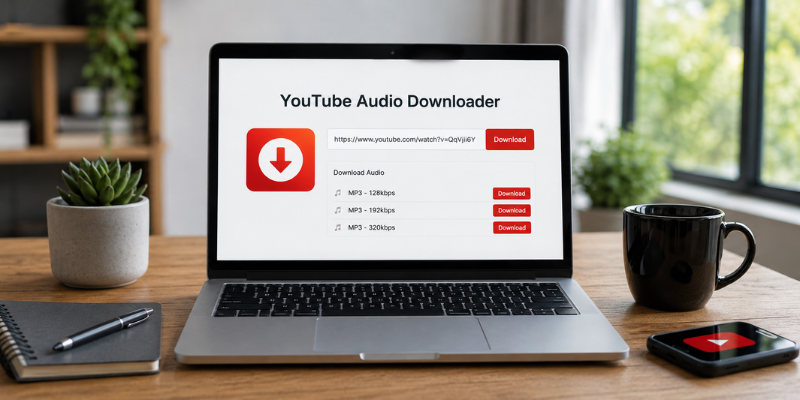
How to Use a YouTube Audio Downloader
Although different tools have slightly different interfaces, the process is usually very simple.
Here’s a typical workflow:
- Copy the YouTube video URL.
- Open your preferred downloader.
- Paste the link.
- Select the audio format.
- Choose your preferred quality.
- Start the conversion.
- Download the finished audio file.
The entire process often takes less than a minute for average-length videos.
Staying Safe While Downloading Audio
Online download tools vary greatly in quality.
Here are several practical safety tips I personally recommend after years of using online utilities.
Avoid Suspicious Websites
If a page opens multiple pop-ups before allowing downloads, leave immediately.
Reliable services rarely overwhelm visitors with advertisements.
Check File Extensions
Audio downloads should normally end with:
- .mp3
- .m4a
- .wav
- .aac
If the download is an EXE file, don’t open it.
Keep Antivirus Software Updated
Even trustworthy sites occasionally display third-party ads.
Updated security software adds an extra layer of protection.
Respect Copyright
Always ensure you have permission to download copyrighted material.
Many creators allow offline listening through official platforms or licenses, while others do not.
Choosing the Best Downloader for Your Needs
The “best” downloader depends on how you plan to use it.
Casual Listeners
Look for:
- Simple interface
- Fast conversion
- MP3 downloads
- Mobile compatibility
Students
Useful features include:
- Batch downloads
- Playlist support
- High-quality speech conversion
Content Creators
Professional users may prefer:
- Lossless audio
- Metadata support
- Multiple output formats
- Fast processing speeds
Selecting the right downloader saves time and improves your overall experience.
Common Mistakes to Avoid
Many first-time users make avoidable mistakes.
Some of the most common include:
- Downloading from untrusted websites
- Ignoring audio quality settings
- Installing unnecessary browser extensions
- Clicking fake download buttons
- Downloading copyrighted material without permission
A little caution goes a long way toward keeping your device secure.
Frequently Asked Questions
Is a YouTube audio downloader free to use?
Many online tools offer free audio conversion. Some premium applications provide faster speeds, batch downloads, and additional formats.
Which audio format offers the best balance between quality and file size?
MP3 at 320 kbps is one of the most popular choices because it provides excellent sound quality while keeping storage requirements reasonable.
Can I use downloaded audio on my smartphone?
Yes. Most MP3 and M4A files work perfectly on Android phones, iPhones, tablets, laptops, and desktop computers.
Are online YouTube audio downloaders safe?
Many are safe, but some contain intrusive ads or malicious downloads. Use reputable services, avoid suspicious pop-ups, and keep antivirus protection enabled.
Can I download entire YouTube playlists as audio?
Some desktop applications and advanced online downloaders support playlist downloads, allowing multiple audio files to be converted at once.
Conclusion
A youtube audio downloader can be a practical solution for enjoying educational content, podcasts, interviews, and music offline. The key is choosing a reliable tool that offers good audio quality, fast performance, and strong security practices. Always respect copyright rules and download content responsibly. With the right approach, offline listening becomes simple, efficient, and enjoyable.